Blackhats

Posted: January 19, 2015 by IntentionalPrivacy in Hacker gangs
Tags: , , , , ,

I saw the Blackhat movie yesterday, and in my opinion, it was not that great. Realistic? Yes, but formulaic and even predictable, with a little hacking thrown in to make it seem original. The script—while well-researched—felt as if it had been churned out of a script-writing program like Final Draft. I was hoping for a movie like Sneakers, which is realistic, but not at all formulaic and it’s very funny besides.

And speaking of blackhats, some purported members of Lizard Squad have recently been arrested for the Christmas attacks on Microsoft Xbox and Sony PlayStation networks during a joint investigation by the FBI and the British police. The Daily Mail reported that Jordan Lee-Bevan was arrested in Southport, Merseyside on January 16, 2015. In Finland, seventeen-year-old Julius “Ryan/Zeekill” Kivimäki was questioned last month, while Vincent Omari, Twickenham, south-west London, was arrested and released on bail shortly after they gave interviews to Sky News on December 27, 2014, about the alleged role of Lizard Squad in the Christmas gaming attacks.

Ironically, according to KrebsOnSecurity, Lizard Squad’s website, LizardStresser[dot]su, which they used to “coordinate attacks and sell subscriptions to its attacks-for-hire service” was hacked by another hacker group, Finest Squad. Brian Krebs acquired a copy of their user account information database—unfortunately stored unencrypted! Apparently the same information was also sent to the FBI. You can read more about the battles between Lizard Squad and Finest Squad on Business Insider’s article.

For whom the bell tolls

Posted: January 7, 2015 by IntentionalPrivacy in free speech

“Any mans death diminishes me, because I am involved in Mankinde” … and so, #Je Suis Charlie.

Reason says it better than I can, “Today is an awful day for the basic project of free inquiry. Do you really wanna be Charlie Hebdo? Then get on out there, live and speak bravely. And God help you.”

Je-Suis-Charlie

Want a good reason to back up your devices?

Posted: January 5, 2015 by IntentionalPrivacy in Uncategorized

Read Alina Simone’s story in the New York Times How My Mom Got Hacked.” Lessons learned, she says, are:

1. Back up your stuff!

2. Keep your operating system and applications patched!

3. Do not open email attachments!

The amount of information collected on each of us is growing astronomically every day. What can you do to help protect your—as well as your family’s—information?

Note: This information is meant to be a starting place.Technology is constantly changing, so you must consider whether the information provided is timely and applicable to your situation. In order to adequately protect yourself and your family, you also might need to consult with your attorney or accountant or obtain other professional advice.

What information do you want to protect? Here are some categories you might want to consider:

Ad/cookie tracking Identity information Reputation
Digital identity Intellectual property Social media
Electronic devices Location Trash
E-mail Mailbox Travel
Family Medical information Voting
Financial information Personal safety Work information

Where are the threats to your information? Here are some common threats:

Data loss or theft

  • Backup media
  • Mail/trash
  • Organization w/ your info goes bankrupt
  • Paper
  • Website
Types of Malware

  • DNS Changer
  • Drive-by downloads
  • Keyloggers
  • Phishing email
  • Rootkits
  • Search engine poisoning
  • Social media malware
  • Torrents
  • Spyware, Trojan horse, virus, worms
  • Zombies/botnets
  • Etc.
Device loss or theft

  • Computer
  • DVD/CD
  • Backup media
  • USB drives
  • Portable electronic devices
  • Laptop, iPad, smart phones, tablets
Natural or man-made disasters

  • Fires
  • Floods
  • Tornadoes
  • Earthquakes
Personal safety

  • Craig’s List
  • Data leakage
  • Identity theft
  • Social media
ID theft Social engineering / Pretexting

Who do you trust with your information? Here are some organizations that you probably trust:

Accountant, lawyer, other professionals Religious & charity organizations
Employers Schools & Libraries
Financial institutions—banks, credit unions, loans & credit cards, brokerages Retailers & e-commerce sites
Government agencies Social sites
Health care—doctor, dentist, hospital, labs Websites
Insurance companies And …?

Why do you trust people or organizations?

  • Do they have a legitimate need for your information?
  • Do they have policies and procedures to tell you what they do with your confidential information?

When do you trust people or organizations?

  • Do you give confidential information on the phone, in email, texting, or in person?
  • Did you initiate the information exchange?
  • If you don’t feel comfortable, don’t do it.

How do you give people or organizations your confidential information? Think about advantages and disadvantages to giving out your information in person, over the phone, in email or in text messages, on a secure website. If you’re uncomfortable giving out information in a particular situation: don’t do it! Find another way to give the information.

General Tips

  • Don’t leave your electronic devices—cell phones, laptops, tablets, iPads, etc.—unattended in public, including hotel rooms.
  • Don’t ask strangers to watch your things while you go to the restroom or load up on more coffee.
  • Don’t leave your purse or briefcase unattended in public: including shopping carts, restaurants, and coffee shops.
  • Don’t use easy-to-guess passwords: http://www.dailymail.co.uk/sciencetech/article-2063203/This-years-easiest-guess-passwords–discovered-hackers-worked-out.html
  • Don’t post private information on social websites. Remember you have no expectation of privacy on social websites.
  • Data leakage:
    • Be careful about the information you throw in your trash.
    • Collect your mail as soon as possible.
    • Use vacation holds or have a friend collect your mail if you will be gone for more than a couple of days.
    • Do not announce on Facebook or other social media that you are going on vacation. Wait until you get back to share those fabulous pictures!
    • Keep your electronic devices and other valuables out of sight in your vehicle.
    • Read software and services licenses.
    • Use a password or a pin to protect your smart phone.

Let’s look back at 2014 to review events that could impact our information privacy. Some substantial vulnerabilities occurred this year including the Heartbleed bug, Shellshock, and POODLE, along with the usual Microsoft, Java, browser, and Adobe Flash and Reader problems. There have been some notable payment system breeches: Sony, Kmart, Jimmy Johns, Home Depot, Apple, Dairy Queen, Community Health Systems to name a few … even some Goodwill payment systems got hacked.

What can you do to protect yourself? Here are a couple things to do:

  • Protect your information!

Don’t give it out unless it’s absolutely necessary. If your doctor—like mine did—asks you to sign a release so they can use your deidentified data in a study, ask them what information they are sending and who they are sending it to: Does it include your initials, your first name, your zip code, your street, your age and gender, your diagnosis, your treatment? If they frown at you and say it’s deidentified, ask them what that means to them.

According to HIPAA, there are 2 main methods to de-identify patient data, the “expert determination” method and the “safe harbor” method. The safe harbor method is usually safer because it removes 18 specific identifiers from the research data, such as name, age, dates must be year only, telephone numbers, address, full-face pictures, and account numbers. The expert method depends on an “expert” to determine what’s safe to disclose.

For instance, why do you care if someone shares your birth date? The birthday paradox is a probability theory that explains if you’re in a room with 23 other people, the chances that at least 2 people in the room will share a birthday is 50%, and in a group of 70 people, the probability that at least 2 of them will share a birthday reaches 99.9%. However, the probability that 2 people will share the same birth date is considerably smaller.

A recent article in American Medical News explained how Latanya Sweeney, PhD, a Harvard University researcher, was able to attach 241 identities to the deidentified medical information of a database of 1,130 research patients, using birth date, gender, and zip code combined with public records, such as US Census records or voter registration. That’s 22%! Yikes!

To see how identifiable you are by using those parameters, visit the Data Privacy Lab.

  • Make your important passwords unique for each account, change them often—every six months or sooner, especially if the web site is hacked—and implement two-factor authentication on sites that allow it, especially sites like email, banking, or e-commerce.

What is two-factor authentication? Two-factor authentication means that instead of using just a password to access your account, you add an additional method of verifying your identity.

Google Authenticator is a way to add a second factor; it’s easy to use and it sends a code via a text message to your device. You can set it up so that you only have to input a code if a new device tries to use the account or your password changes. In case you don’t have an Internet connection or cell phone service, you can download a set of 10 codes for backup authentication. Make sure you keep these codes safe! I store mine right in KeePass.

  • Back up your personal information on all your devices—documents, photos, music, videos.
  • Lock your devices: Use PINs, passwords, puzzles, or biometrics.
  • Install software like Find My Phone (Windows, Android, or iPhone) or Prey; if your device is lost or stolen, send it a lock and erase it. Be safe, call the police. Do not try to recover it yourself.
  • Don’t save password information in your browser! Here’s an article on how to disable saving passwords in IE, Safari, and Firefox browsers, and Chrome.

Can’t remember all those passwords? Neither can I! You can use a password-protected Excel 2007 or later spreadsheet (do not save in compatibility mode), download a password manager like KeePass, or use a cloud-based password manager like LastPass.

Do not lose the master password! If you might forget, put it someplace safe like your safe-deposit box.

I have used all three options, and I prefer KeePass, although Excel is in some ways more convenient because you can decide on the fields you use. The data is stored on your device (unless you load it in the cloud yourself). I use KeePass’s professional and portable versions, and KeePass2Android. Try to only update the KeePass database on one device and copy it to your other devices so you don’t get confused as to which device contains the most up-to-date copy of the database. I date the database when I add a new account or change a password (BlahXX-XX-XXXX), so I know to move it to my other devices.

It is very important to back up this database and store a copy that you update regularly —as well as a printed copy—in your safe-deposit box.

LastPass is convenient, but I don’t like the idea of not knowing where my data is stored. Also, if the service is down—as happened last August for over 12 hours—can you access your accounts? According to their documentation, you should be able to. However, it is always best to keep a non-cloud-based back up for cloud-based services.

  • Keep your operating system and applications up to date. When an operating system is no longer supported, it is time to either get the device off the Internet or—if the option is available—upgrade to a new operating system or download and install an open-source operating system. If none of those options work, wipe the device and recycle it here or at one of the Goodwill locations that partners with the Dell Reconnect program.

Spring clean your installed apps: if you don’t use it, uninstall it. Fewer apps will free up resources like memory and drive space, and your device might even run faster.

One application to consider installing on a Windows machine is Secunia’s Personal Software Inspector. It makes sure that all your updates and patches are current. I test a lot of software and some apps don’t always have automatic updates; this app is wonderful!

Everyone here at IntentionalPrivacy.com wishes you a prosperous, happy, healthy, and safe 2015! We’re happy you read us.

The new movie, The Imitation Game, about Alan Turing and his romance with Joan Clarke, already has won rave reviews across Rotten Tomatoes, IMDB, Rolling Stone, and Roger Ebert.

The effort by Alan Turing and about 10,000 other people at Bletchley Park was cryptanalysis. A cryptanalyst breaks codes or ciphers.

The Enigma machine was a cryptographic device. Cryptography is the making and using of codes or ciphers. A cryptographer creates codes or ciphers.

The general study of making and breaking codes and ciphers is cryptology.

NSA Museum Front 1

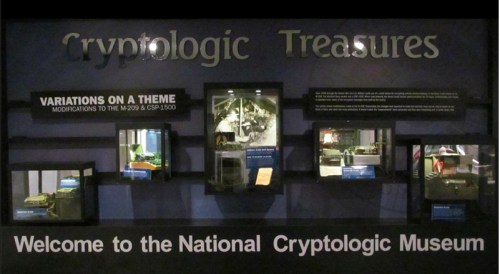
The Museum of the National Security Agency is open to the public and sells memorabilia.

Encryption is putting a message into a code or cipher.

Decryption is the extraction of a message from its code or cipher. Decryption must be carried out by the intended receiver; but it might be done by anyone else who intercepts the message.

crypto-bion-front-19

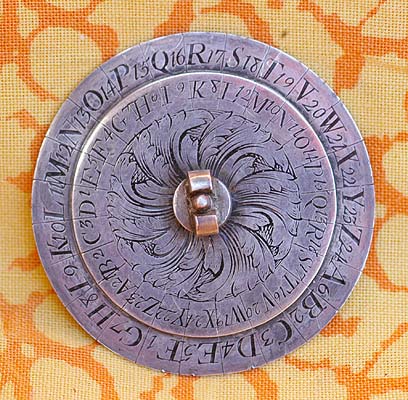
Above: Alberti cipher disk made by Louis Brion for Louis XV (Gessler collection Duke University Information Science and Information Studies)

A cipher (sometimes still spelled cypher) is an orderly substitution or rearrangement of characters. A=Z, B=Y, C=X, … is a substitution. Writing a long message out horizontally, then re-writing it vertically is a rearrangement. A cipher is an algorithm. It is easy to write a computer program that will take a message, encipher it, and print out the encrypted message.

A code is a pre-arranged system of signals that have no direct relationship to the symbols they map. In baseball, the catcher’s signs and the constant fidgeting of the third base coach are coded signals. A computer program to encode a message requires a look-up table.  A code cannot be reduced to a mathematical formula.  The “Little Orphan Annie Decoder Ring” of the classic Christmas Story was actually a cipher disk.

Leon Battista Alberti (1404-1472) was perhaps second only to Leonardo da Vinci in his range of achievements. For 500 years, the Alberti Cipher Disk was the essential cryptographic tool, capable of creating the Vigenere Cipher, a 26×26 polyalphabetic system.  If you put “cipher disk” into a browser for images, you can find antiques and moderns.  The NSA Museum store has sold replicas of the disks used by the Confederate States secret service.  Geocaching is a treasure hunt or scavenger hunt game that includes GPS tracking and figuring out clues at each location.  Geocachers often use cipher disks (even though there’s an app for that) just because the mechanisms are cool.


Image  —  Posted: December 31, 2014 by uszik11 in Historical and future use of technology
Tags: , , , , , ,

The number of independent theaters showing The Interview has been updated at Variety. Although not in the main list, Michael Moore’s theater, The Bijou, in Traverse City, Michigan, and George RR Martin’s theater, Jean Cocteau Cinema in Santa Fe, New Mexico, will also be showing the film.

You can also stream the video in HD on Google Play, YouTube Movies, Microsoft’s Xbox Video and  Sony’s own website, http://www.seetheinterview.com. A forty-eight hour rental is $5.99, while buying the movie costs $14.99.

David Drummond,

Christmas Present: The Interview

Posted: December 23, 2014 by IntentionalPrivacy in free speech, Security Breach
Tags: , , ,

The Art House Convergence  offered Sony a way to distribute The Interview, so there will be limited showings of the movie starting on Christmas Day. Here is a list of theaters currently showing the movie according to Variety, which they will continue to update.

In a statement released on Tuesday, 12/23/2014, President Obama praised Sony’s decision to release the movie.

In other news, North Korea experienced massive Internet outages for much of Monday, but Internet access was restored on Tuesday according to Reuters.

I still think this story would make a great plot.

Happy holidays!


Trading convenience for security

Posted: December 22, 2014 by IntentionalPrivacy in Tips
Tags: , , , ,

These are some great tips from Gary Miliefsky at SnoopWall. You can either watch his video or read the interview. I just installed his SnoopWall Privacy app on my Android phone. I’ll let you know how it goes!

On December 17, Matt Mason (@MattMason), chief content officer at BitTorrent, tweeted that “Sony should release The Interview as a BitTorrent Bundle. This is the very thing the platform is designed for.”

Okay! An unlikely hero rides to the forefront!

What is BitTorrent?

BitTorrent is file-sharing software that uses a peer-to-peer computer model. Peer-to-peer means that files transfer from device to device instead of getting them from a centralized server.

How it works: The hoster of a file breaks a large file into smaller, equal-sized pieces and stores the pieces on seed computers. Then the hoster creates a small torrent descriptor file that they advertise. The torrent software is installed on a client computer. When the client decides to download a file, the software locates the pieces on seed computers and starts transferring pieces. The pieces typically arrive out of order and are re-arranged into the proper order when the transfer of all the pieces completes. That means the download can be stopped at any time and re-started without having to start the download over. When the file has been completely downloaded, the client with the completed file becomes a seed computer for other clients to download the pieces.

According to Wikipedia, an estimate of monthly BitTorrent users was about 250 million in January 2012. That means that as the file pieces are distributed to seed computers and downloaded by client computers who then become seed computers, the speed of file distribution increases.

You may even have been using BitTorrent already and didn’t know it. It is a component in Amazon S3 Simple Storage Service, an online service providing cloud applications, backup, and content distribution. Open source and free software projects use it to distribute downloads. Blizzard Entertainment’s Blizzard Downloader client (Diablo III, Starcraft II, and World of Warcraft) uses it for games, content, and patches. Universities sponsoring BOINC distributed computing projects often offer BitTorrent to reduce bandwidth costs. It supports Facebook and Twitter.

Why could BitTorrent release The Interview when the major theater chains couldn’t?

The peer-to-peer model would make it difficult for the attackers to stop downloads of the file.

And, “BitTorrent Bundle is a safe and legal way for Sony to release this film, and they would join the nearly 20,000 creators and rights holders now using the Bundle publishing platform,” said BitTorrent according to VentureBeat.

Why does BitTorrent think it is better to release the movie through them instead of through Sony’s own online video channels?

According to BitTorrent, by “using the paygate option, Sony are able to set the price for the film and release it widely without implicating anyone or exposing any third party to a terrorist threat,” and “it would strike a strong note for free speech.”

Sony Entertainment CEO Michael Linton told CNN on December 19th that “no ‘major video on demand distributor’ has been ‘willing to distribute’ the film. ‘We don’t have that direct interface with the American public, so we need to go through an intermediary to do that.’”

Sony, meet BitTorrent.